Linkedin Profile Optimization Tips 2026
How to optimize your Linkedin profile to get more clients, find more jobs and get better exposure in 2026! Lets break it down. Text the word Roast to 973-841-8868 and we will roast your profile.

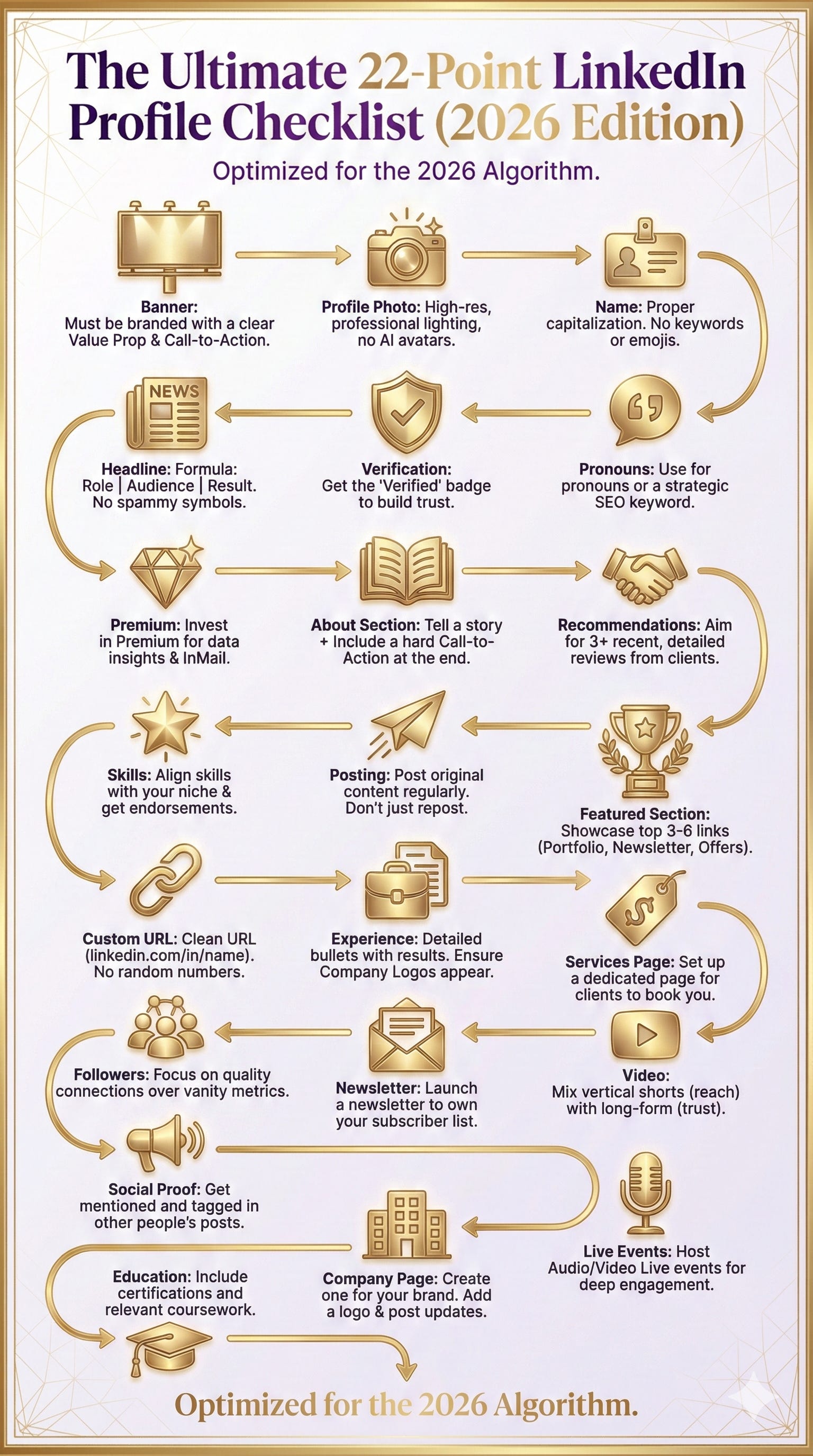
How to Optimize Your LinkedIn Profile in 2025: The Complete 22-Point Checklist
The Ultimate Guide to Building a High-Converting LinkedIn Profile That Attracts Clients, Jobs, and Opportunities
Your LinkedIn profile in 2025 isn’t just an online resume—it’s your digital storefront, personal brand headquarters, and often the deciding factor between landing your dream opportunity or being passed over.
PS evyai.com can write up your whole profile in seconds and make you a great headshot!
After analyzing over 10,000 LinkedIn profiles, I’ve discovered that 95% of professionals are making critical mistakes that cost them thousands in lost opportunities. The good news? Most can be fixed in under an hour.
Want to know exactly what’s holding YOUR profile back?
👉 Text ROAST to 973-841-8868 and get an instant AI-powered analysis of your LinkedIn profile with specific recommendations.
The 22 Critical Profile Elements (And Why They Matter)
1. LinkedIn Banner: Your Digital Billboard
The Problem: 67% of LinkedIn users have either no banner or use the default blue gradient—like owning a highway billboard and leaving it blank.
The Solution: Your banner (1584 x 396 pixels) should include:
Your logo or personal brand elements
Clear value proposition (who you help + how)
Call-to-action (website, email, or booking link)
Professional design that works on mobile
Quick Win: Use Canva’s free LinkedIn banner templates. Update it quarterly to stay fresh.
2. Profile Photo: The 21x Multiplier
The Data: Profiles with professional photos receive:
21x more profile views
36x more messages
9x more connection requests
What Works:
Professional headshot (not a selfie or group photo crop)
Current (within 2 years)
High resolution (800 x 800 pixels minimum)
Your face occupies 60% of the frame
Good lighting, clean background
Genuine smile, eye contact with camera
Investment Worth Making: A professional headshot ($150-$500) is one of the highest ROI investments in your professional presence.
3. Name Field: Keep It Simple and Compliant
LinkedIn’s Rules: Your name field should contain ONLY your actual first and last name.
NOT Allowed: ❌ Keywords (”John Smith | LinkedIn Expert”) ❌ Credentials (use the credentials section) ❌ Emojis or special characters ❌ All lowercase or ALL CAPS
Correct Format: Proper capitalization of your actual legal name.
Pro Tip: Violating these rules can get your profile restricted or suspended.
4. Headline: Your 220-Character Sales Pitch
The Missed Opportunity: Most LinkedIn headlines use only 40% of available characters. That’s like paying for a full-page ad and using half of it.
Winning Formula: [What You Do] | [Who You Help] | [Key Result/Value Proposition]
Example Transformation:
Before: “Marketing Manager at Tech Company”
After: “Marketing Manager | Helping B2B SaaS Companies Generate 10x More Qualified Leads Through Content-Driven Growth Strategies”
Action Step: Use all 220 characters. Include searchable keywords your ideal clients use.
💡 Not sure if your headline is optimized? Text ROAST to 973-841-8868 for an instant analysis.
5. Profile Verification: The Trust Signal
Why It Matters: With AI-generated fake profiles proliferating, verification separates real professionals from imposters.
How to Verify:
Go to Settings & Privacy
Account preferences → Verifying your profile
Upload government ID or verify work email
Get your verification shield badge
Benefit: Higher trust, better search visibility, protection against impersonation.
6. Pronouns Field: Strategic Real Estate
Two Approaches:
Option 1: Use for actual pronouns (he/him, she/her, they/them)
Option 2: Add a relevant keyword (”Speaker,” “Hiring,” “AI Expert”)
My Take: If pronouns matter to you professionally, use them. Otherwise, consider one strategic keyword.
7. LinkedIn Premium: Worth the Investment?
For Most Serious Professionals: Yes.
Key Features That Pay Off:
InMail credits (message anyone)
See ALL profile viewers (not just last 5)
Advanced search filters
LinkedIn Learning access
Applicant insights
ROI Example for Service Providers:
Cost: $60/month = $720/year
Land ONE $5,000 client from Premium features
ROI: 594%
Who Needs It: ✅ Active job seekers ✅ B2B sales professionals ✅ Business developers ✅ Recruiters ✅ Anyone building a personal brand
Sales Navigator ($100/month): Essential for full-time B2B sellers doing daily outreach.
8. About Section: Where Conversions Happen
The Framework:
Hook (First 300 characters - shows before “see more”): Start with a compelling statement, question, or result
Your Story (2-3 paragraphs): How you got here, why you do what you do
What You Do & Who You Help: Specific problems solved, types of clients served
Proof & Credibility: Key achievements with numbers, notable clients/companies
Call-to-Action: How to work with you, contact information
Character Limit: 2,600 maximum - use 1,200-2,000 for optimal impact
Write in First Person: Be conversational, not corporate. Personality matters.
9. Recommendations: Third-Party Validation
The Power: 87% of buyers say recommendations influence their decision.
How to Get Great Ones:
Make a list: Recent clients, former managers, successful collaborators
Personalize your request: Never use LinkedIn’s generic message
Make it easy: Offer to draft something they can edit
Give direction: Tell them what to highlight (specific results, skills)
Template: “Hi [Name], would you be willing to share a brief recommendation about our work on [project]? Specifically mentioning [result] would be incredibly helpful. Happy to draft something if that’s easier!”
Quality > Quantity: 5 stellar recommendations beat 20 generic ones.
10. Skills: Align with Your Goals
The Strategy:
Top 3 Skills: Your core expertise—what you want to be known for and hired for Next 7-10: Supporting competencies Remaining: Additional relevant capabilities
Critical: Your top 3 skills should have 20+ endorsements each.
Action Steps:
Remove outdated or irrelevant skills
Pin your 3 most important to the top
Take LinkedIn Skill Assessments for verification badges
Ask connections to endorse your top skills
Common Mistake: Having all 50 skills filled looks like keyword stuffing.
11. Content Posting: Your Visibility Engine
The Truth: Your profile matters, but your activity is what drives results.
The Data:
Posts reach 3x your follower count in impressions
Regular posters see 5x more profile views
61% of LinkedIn users discover new opportunities through content
Optimal Frequency:
Minimum: 2-3x per week
Sweet Spot: 4-5x per week (Monday-Friday)
Maximum effective: Once per day
What the Algorithm Rewards: ✅ Original content (not external links in main post) ✅ Engagement in first hour ✅ Meaningful comment conversations ✅ Content that keeps users on LinkedIn
Post Structure:
Hook (first 2 lines grab attention)
Value (short paragraphs, white space)
CTA (ask a question to drive comments)
Best Times: Tuesday-Thursday, 8-10 AM, 12-1 PM, or 5-6 PM
💡 Struggling with content ideas? Text ROAST to 973-841-8868 for personalized content suggestions based on your profile.
12. Featured Section: Your Highlight Reel
What It Is: Prime real estate below your About section showcasing your best work.
What to Feature (up to 6 items):
Your best-performing posts
Lead magnets or free resources
Case studies and testimonials
Portfolio pieces
Media mentions
Booking/contact links
Strategic Use:
For Service Providers:
Client testimonial posts
Link to book a call
Case study or results
Signature framework
Popular educational content
For Job Seekers:
Resume (PDF)
Portfolio link
Projects you’re proud of
Published articles
Certifications
Update quarterly with fresh, relevant content.
13. Custom URL: Professional and Memorable
Default: linkedin.com/in/joe-smith-b7a34982a ❌
Custom: linkedin.com/in/joesmith ✅
Benefits:
Professional appearance
Easy to share verbally
Better for SEO
Memorable and brandable
How to Set:
Edit public profile & URL
Click edit icon next to custom URL
Enter 3-100 characters (letters, numbers, hyphens only)
Best Format: Your full name or firstname-lastname
Use It Everywhere: Business cards, email signature, resume, website, social bios
14. Experience Section: Proof of Your Track Record
Transform Responsibilities into Achievements:
Instead of: “Responsible for managing sales team”
Write: “Led 12-person sales team to 157% of quota, generating $8.2M in new revenue. Reduced sales cycle by 23 days through CRM optimization.”
Formula: [Action Verb] + [What You Did] + [Quantifiable Result]
Best Practices:
Link positions to company pages (adds logos)
Use bullet points or short paragraphs
Include numbers and percentages
Focus on impact, not duties
Add media (presentations, projects, awards)
How Far Back: Detailed for last 10 years, brief summaries beyond that
15. Services Page: Your LinkedIn Storefront
What It Is: A feature allowing you to showcase and sell services directly on LinkedIn.
Requirements: LinkedIn Premium, complete profile, supported country
What to Include:
Clear service titles (60 characters)
Detailed descriptions with deliverables
Transparent pricing (fixed, range, or starting at)
Duration/delivery timeframes
FAQs
Pricing Strategy: Offer tiered packages (starter, standard, premium) to appeal to different budgets.
Alternative if Unavailable: Use Featured section to link to external booking/service pages.
16. Follower Growth: Quality Over Vanity Metrics
The Thresholds:
500: Credibility baseline
1,000: Newsletter eligibility
5,000: Influencer territory
10,000+: Thought leader status
Authentic Growth Strategies:
Post valuable content consistently (3-5x/week)
Engage authentically (comment on 10-15 posts daily)
Optimize profile for follows (clear value prop in headline)
Strategic connection requests (personalized, not generic)
Collaborate with others (interviews, co-created content)
Use Creator Mode (if building thought leadership)
Reality Check: 1,000 engaged followers > 10,000 ghost followers
Engagement Rate > Follower Count
17. LinkedIn Newsletter: Direct Access to Your Audience
What It Is: Publications you send directly to subscribers—they get notified every time you publish.
Requirements: 150+ followers, Creator mode enabled
Why Start One:
Bypasses the algorithm (all subscribers notified)
Builds dedicated audience
Establishes authority
LinkedIn promotes newsletters in recommendations
Publishing Frequency: Weekly or bi-weekly (consistency matters more than frequency)
Content Ideas:
Educational how-tos
Industry insights and trends
Personal stories and lessons
Curated best-of-week
Q&A with subscribers
Pro Tip: You can have up to 5 newsletters on different topics.
18. Video Content: The 5x Engagement Multiplier
The Data:
Video posts get 5x more engagement than text
Native LinkedIn videos get 3x more reach than YouTube links
59% of executives prefer video over text
Types of Video:
Short-Form (30-90 seconds):
Quick tips
Reactions to trends
Personal updates
Optimal for mobile
Long-Form (3-10 minutes):
Tutorials and deep dives
Interviews
Case studies
Educational content
Video Best Practices:
Hook in first 3 seconds
Always add captions (85% watch without sound)
Optimize thumbnail (first frame)
Write compelling post caption
Engage with comments immediately
Content Mix: 60% video, 40% text/image posts
💡 Want video content ideas for YOUR niche? Text ROAST to 973-841-8868.
19. Social Proof: Getting Others to Talk About You
What It Is: Evidence that other people value your expertise—mentions in posts, recommendations, testimonials, shares.
Why It Matters: Third-party validation is 92% more trusted than self-promotion.
How to Build It:
Deliver exceptional results (foundation of all social proof)
Make testimonials easy (offer to draft for busy clients)
Share client success stories (with permission, tag them)
Engage meaningfully (add value in comments)
Collaborate with others (podcasts, co-created content)
Check Your Social Proof: Search your name in quotes on LinkedIn, filter by “Posts” to see who’s mentioning you.
Goal: 5-10 organic mentions monthly from clients/partners
20. LinkedIn Live Events: Real-Time Authority Building
What It Is: Live video broadcasting directly to your LinkedIn network.
Why Use It:
Algorithm heavily promotes Live content
Sends notifications to all followers
Real-time interaction builds deeper relationships
One Live = multiple pieces of repurposed content
Requirements: Apply for LinkedIn Live access (150+ followers, good standing)
Content Ideas:
Ask Me Anything (AMA)
Expert interviews
Workshops and training
Behind-the-scenes
Industry news analysis
Optimal Length: 30-45 minutes
Frequency: Start with monthly, build to bi-weekly
Promotion: Announce 1 week before, remind 3 days, 1 day, and morning-of
21. Company Page: Amplify Your Personal Brand
Why It Matters:
Adds legitimacy to your business
Another content distribution channel
Enables employee advocacy
Required for LinkedIn ads
Shows you’re an established business
Must-Haves:
Professional logo (300 x 300 px)
Cover image (1128 x 191 px)
Complete company details
Regular content (3-5 posts/week)
Clear tagline and About section
Growth Strategy:
Invite your network to follow
Employee advocacy (team engagement)
Cross-promote with personal profile
Valuable, consistent content
Best Practice: Use both personal profile (thought leadership) AND company page (brand building)
22. Education Section: Credibility and Keywords
What to Include:
Formal degrees and diplomas
Professional certifications
Executive education programs
Relevant bootcamps or training
Optimization Tips:
For Recent Graduates:
Relevant coursework
Academic achievements
Leadership positions
Projects or thesis
Skills developed
For Experienced Professionals:
Notable achievements only
Honors and awards
Skip unless it adds value
Activities and Societies: Include leadership roles, professional organizations, volunteer work
Add Media: Thesis, projects, award certificates, presentations
SEO Value: School names, degrees, and certifications are searchable—helps alumni find you
Putting It All Together: Your 30-Day LinkedIn Optimization Plan
Week 1: The Basics
[ ] Update profile photo (professional headshot)
[ ] Create custom banner with value prop
[ ] Set custom LinkedIn URL
[ ] Rewrite headline using the formula
[ ] Apply for profile verification
Week 2: Content Sections
[ ] Rewrite About section with the 5-part framework
[ ] Update Experience section with achievement focus
[ ] Request 3-5 recommendations
[ ] Optimize top 3 skills, get endorsements
[ ] Add 3-6 items to Featured section
Week 3: Activity & Engagement
[ ] Post valuable content 3x this week
[ ] Engage with 15 posts daily (meaningful comments)
[ ] Send 10 personalized connection requests
[ ] Turn on Creator Mode (if appropriate)
[ ] Start planning newsletter topics
Week 4: Advanced Features
[ ] Launch LinkedIn newsletter
[ ] Create and publish first video post
[ ] Optimize company page (if applicable)
[ ] Set up Services page (if applicable)
[ ] Apply for LinkedIn Live access
The Biggest Mistakes to Avoid
❌ Treating LinkedIn Like a Resume: It’s a living, breathing personal brand platform
❌ Optimizing Once and Forgetting: Update quarterly minimum
❌ Not Posting Content: Profile without activity = invisible
❌ Generic Everything: Stand out with specificity and personality
❌ No Call-to-Action: Tell people what to do next
❌ Inconsistency: Sporadic activity kills momentum
❌ Ignoring Engagement: Content without engagement is wasted effort
❌ Being Too Salesy: Provide value first, sell second
Your Next Steps: Get Your Personalized Profile Analysis
You now have the complete framework for LinkedIn profile optimization in 2025. But here’s the challenge: knowing what to do and seeing what YOUR specific profile needs are two different things.
That’s why I want to make this easy for you:
🔥 Get Your FREE Profile Roast
Text the word ROAST to 973-841-8868
Our AI will instantly analyze your LinkedIn profile across all 22 areas and send you:
✅ A detailed breakdown of what’s working ✅ Specific issues holding you back ✅ Priority fixes ranked by impact ✅ Personalized recommendations for YOUR niche ✅ Quick wins you can implement today
This takes 60 seconds and could transform your LinkedIn results.
Final Thoughts: LinkedIn is a Long Game
Here’s the truth: Optimizing your LinkedIn profile isn’t a one-time task. It’s an ongoing process of refinement, testing, and improvement.
But the effort is worth it.
A fully optimized LinkedIn profile working in harmony with consistent, valuable content can:
Generate inbound leads while you sleep
Position you as the go-to expert in your niche
Open doors to opportunities you never knew existed
Build relationships that transform your career or business
Create a personal brand that compounds over time
The best time to optimize your profile was last year.
The second-best time is right now.
Start today. Text ROAST to 973-841-8868 and get your personalized roadmap.
About the Author
I’m Joe Apfelbaum, CEO and Founder of evyAI, known as “The LinkedIn Daddy.” I’ve helped thousands of professionals transform their LinkedIn presence from overlooked to in-demand.
I’ve trained over 1,400 entrepreneurs in my High Energy Networking community, authored “High Energy Prompting,” and personally reviewed over 10,000 LinkedIn profiles.
My mission: Help 1 million professionals master LinkedIn and AI to build the business and life they deserve.
Connect with me on LinkedIn: linkedin.com/in/joeapfelbaum
Learn more about evyAI: evyai.com
FAQ: LinkedIn Profile Optimization
Q: How long does it take to optimize a LinkedIn profile? A: Basic optimization: 1-2 hours. Complete overhaul with content creation: 4-6 hours spread over a week.
Q: Do I need LinkedIn Premium to be successful? A: No, but it significantly accelerates results for active networkers, job seekers, and business developers.
Q: How often should I update my profile? A: Review quarterly. Update headline/about when goals change. Add new achievements monthly.
Q: What’s more important: followers or connections? A: Engagement rate matters most. Quality connections who engage > vanity follower metrics.
Q: Should I use Creator Mode? A: Yes, if building thought leadership. No, if primarily networking for business development or job search. They turned this off as a feature but see if you still have access..
Q: How many times per week should I post? A: Minimum 2-3x. Optimal 4-5x. Quality always trumps quantity.
Q: Can I optimize my profile if I’m employed and not job searching? A: Absolutely! LinkedIn is for career advancement, networking, personal branding, and business development—not just job hunting.
Q: What if I’m in a conservative industry? A: Adjust tone and content, but principles still apply. Even lawyers and accountants benefit from optimized profiles.
One More Time: Ready to See What YOUR Profile Needs?
📱 Text ROAST to 973-841-8868
Get your personalized analysis in under 60 seconds.
Your future LinkedIn success starts with knowing where you stand today.
Published: 2025 | Last Updated: January 2025 Reading Time: 35 minutes Share this guide with someone who needs to level up their LinkedIn game.
#LinkedIn #ProfileOptimization #PersonalBranding #LinkedInTips #CareerGrowth #B2BSales #ThoughtLeadership #LinkedInStrategy #ProfessionalDevelopment #NetworkingTips